.png)
Technical Deployment and Customisation Guide


Introduction
propella.ai provides Sidekick, a customisable AI Assistant platform, as a fully managed deployment within a client’s Microsoft Azure environment. Once deployed, Sidekick becomes the client’s secure, internal AI platform for organisation-wide use.
The platform includes Everyday Assistant and Research Assistant by default, with additional AI Assistants available based on client needs. A detailed architecture overview is provided in Appendix A.
This document outlines the key steps and checklists for deploying the Sidekick platform in Azure, covering access configuration, permission management, and automated infrastructure setup. It also includes estimated architecture and consumption costs based on company size. These steps support a smooth and efficient deployment, with clearly defined responsibilities for both the client and propella.ai.
Microsoft Azure Cost Estimate
For Company Size: ~100 Employees
| Total | Item | Estimated monthly cost | Estimated upfront cost |
|
|
Architecture | $95.92 | $0.00 |
|
|
Support | $0.00 | $0.00 |
| Basic |
|
$95.92 | $0.00 |
|
|
Consumption* | $233.89 | $0.00 |
| Full Usage |
|
$329.81 | $0.00 |
For a detailed cost breakdown, see Appendix B.
For Company Size: 100-300 Employees
| Total | Item | Estimated monthly cost | Estimated upfront cost |
|
|
Architecture | $207.81 | $0.00 |
|
|
Support | $0.00 | $0.00 |
| Basic |
|
$207.81 | $0.00 |
|
|
Consumption* | $1,143.78 | $0.00 |
| Full Usage |
|
$1,351.59 | $0.00 |
For a detailed cost breakdown, see Appendix C.
Note: Estimated consumption costs are calculated based on high usage scenarios. As adoption scales, an increase in cost is anticipated and indicates successful, ongoing engagement with the platform’s capabilities.
Technical Deployment Steps
This section outlines the deployment sequence for Sidekick in Azure. Client teams are responsible for Steps 1–2 and 4. propella.ai handles Step 3.
⚠️ Note: A user with the Privileged Role Administrator role is required for Steps 1–2 and 4.
Step 1: Confirm Azure Subscription (Client):
Ensure an active Azure subscription is available.
Step 2: Configure Microsoft Entra Group (Client):
1. Create a new Entra Group for the project and add the following members:
- Alistair Toms <alistair.toms@propella.ai>
- Yi Xiang Chee <yixiang.chee@propella.ai>
- Vincent Taneli <vincent.taneli@propella.ai>
- Gus McLennan <gus.mclennan@propella.ai>
- Georgie McLennan <georgie.mclennan@propella.ai>
- Riane Elmoustafa <riane.elmoustafa@propella.ai>
2. Assign Contributor and User Access Administrator roles at the subscription level.
-
Under the Conditions section, select Allow user to assign all roles except privileged administrator roles.
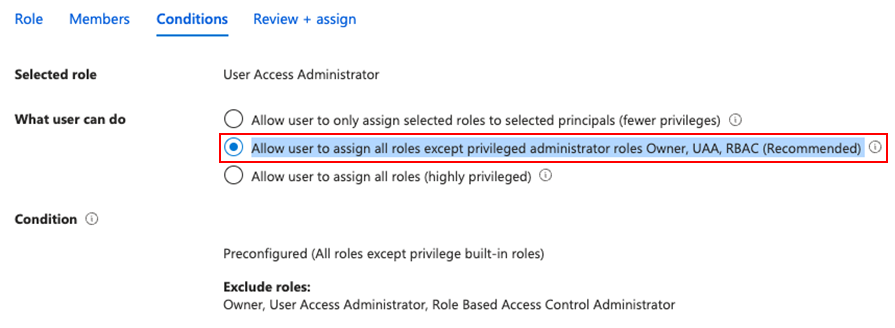
Figure 1: Conditions section - Once finished, go to Subscription > Access Control (IAM) > Condition column for Entra Group under User Access Administrator > View/Edit > Configure and remove User Access Administrator as Constrain role and save the changes.

3. At the Microsoft Entra ID level, go to Microsoft Entra ID > Roles and Administrators:
- Permanently assign the Application Administrator role.
- Temporarily assign Privileged Role Administrator.
- Once app registration is confirmed by propella.ai, revoke the privileged role.
Step 3: Deploy Terraform (propella.ai):
propella.ai will deploy resources using Terraform scripts to ensure consistency and efficiency. This includes:
- Resource provisioning via infrastructure-as-code
- Custom UI configurations
- Creating a resource group and provisioning the Storage Account for knowledge base content
- Sharing the Storage Account name with the client for Step 5
Step 4: Enable Data Steward Access (Client, post-deployment):
- Create a security group named
sg_data_steward - Add designated Data Stewards to the group
- Assign the Storage Blob Data Contributor and Reader role to this group on the provisioned Storage Account (not at the subscription level)
Note: propella.ai will provide the storage account name once deployment is complete.

Appendix A: Architecture Overview
The following diagram illustrates the overall solution architecture for the solution.

Appendix B: Detailed Cost Breakdown for Company Size: ~100 employees
-
Architecture Costs: Basic cost for setting up your Azure environment for the Sidekick Platform.
| Service category | Service type | Region | Description | Estimated monthly cost | Estimated upfront cost |
|---|---|---|---|---|---|
| Compute | Virtual Machines | Australia East | 1 B1ms (1 Core, 2 GB RAM) x 730 Hours (Pay as you go), Linux, (Pay as you go); 0 managed disks – S4; Inter Region transfer type, 5 GB outbound data transfer from Australia East to East Asia | $30.55 | $0.00 |
| Databases | Azure Database for PostgreSQL | Australia East | Flexible Server Deployment, Burstable Tier, 1 B1MS (1 vCore) x 730 Hours, Storage - Premium SSD, 32 GiB Storage, 32 GiB Additional Backup storage - LRS redundancy | $41.91 | $0.00 |
| Storage | Storage Accounts | Australia East | Block Blob Storage, General Purpose V2, Flat Namespace, LRS Redundancy, Hot Access Tier, 500 GB Capacity - Pay as you go, 10 x 10,000 Write operations, 10 x 10,000 List and Create Container Operations, 10 x 10,000 Read operations, 1 x 10,000 Other operations. 1,000 GB Data Retrieval, 1,000 GB Data Write, SFTP disabled | $17.67 | $0.00 |
| Networking | IP Addresses | Australia East | Standard (ARM), 1 Static IP Addresses X 730 Hours, 0 Public IP Prefixes X 730 Hours | $5.79 | $0.00 |
-
Consumption Costs: The cost is estimated at heavy usage. As usage increases, the cost will go up, which is exactly what you’d expect and want to see.
| Service category | Service type | Region | Description | Estimated monthly cost | Estimated upfront cost |
|---|---|---|---|---|---|
| AI + machine learning | Azure OpenAI Service | Australia East | Language Models, Standard (On-Demand), GPT-4o-Global-Deployment-128K, 25,000 x 1,000 input tokens, 1,200 x 1,000 output tokens | $226.71 | $0.00 |
| AI + machine learning | Azure OpenAI Service | Australia East | Language Models, Standard (On-Demand), GPT-4o-Mini Global Deployment, 25,000 x 1,000 input tokens, 1,300 x 1,000 output tokens | $7.18 | $0.00 |
-
Microsoft Support Cost: $0. Can opt it in as needed
Disclaimer: All prices shown are in Australia – Dollar ($) AUD. This is a summary estimate, not a quote. For up to date pricing information please visit https://azure.microsoft.com/pricing/calculator/
This estimate was created at 4/7/2025 5:02:09 AM UTC.
Appendix C: Detailed Cost Breakdown for Company Size: 100-300 employees
-
Architecture Costs: Basic cost for setting up your Azure environment for the Sidekick Platform.
| Service category | Service type | Region | Description | Estimated monthly cost | Estimated upfront cost |
|---|---|---|---|---|---|
| Compute | Virtual Machines | Australia East | 1 B2ms (2 Cores, 8 GB RAM) x 730 Hours (Pay as you go), Linux, (Pay as you go); 1 managed disk – S4; Inter Region transfer type, 5 GB outbound data transfer from Australia East to East Asia | $126.58 | $0.00 |
| Storage | Storage Accounts | Australia East | Block Blob Storage, General Purpose V2, Flat Namespace, LRS Redundancy, Hot Access Tier, 1,000 GB Capacity - Pay as you go, 10 x 10,000 Write operations, 10 x 10,000 List and Create Container Operations, 10 x 10,000 Read operations, 1 x 10,000 Other operations. 1,000 GB Data Retrieval, 1,000 GB Data Write, SFTP disabled | $33.53 | $0.00 |
| Databases | Azure Database for PostgreSQL | Australia East | Flexible Server Deployment, Burstable Tier, 1 B1MS (1 vCore) x 730 Hours, Storage - Premium SSD, 32 GiB Storage, 32 GiB Additional Backup storage - LRS redundancy | $41.91 | $0.00 |
| Networking | IP Addresses | Australia East | Standard (ARM), 1 Static IP Addresses X 730 Hours, 0 Public IP Prefixes X 730 Hours | $5.79 | $0.00 |
-
Consumption Costs: The cost is estimated at heavy usage. As usage increases, the cost will go up, which is exactly what you’d expect and want to see.
| Service category | Service type | Region | Description | Estimated monthly cost | Estimated upfront cost |
|---|---|---|---|---|---|
| AI + machine learning | Azure OpenAI Service | Australia East | Language Models, Standard (On-Demand), GPT-4o-Global-Deployment-128K, 120,000 x 1,000 input tokens, 7,000 x 1,000 output tokens | $1,117.72 | $0.00 |
| AI + machine learning | Azure OpenAI Service | Australia East | Language Models, Standard (On-Demand), GPT-4o-Mini Global Deployment, 100,000 x 1,000 input tokens, 2,400 x 1,000 output tokens | $26.06 | $0.00 |
- Microsoft Support Cost: $0. Can opt it in as needed
Disclaimer: All prices shown are in Australia – Dollar ($) AUD. This is a summary estimate, not a quote. For up to date pricing information please visit https://azure.microsoft.com/pricing/calculator/
This estimate was created at 7 April 2025 5:16:30 AM UTC.