.png)
AI Dojo Platform Technical Design

Version 1.5
Last Updated: 2nd October 2026
1. Introduction
1.1 Purpose
The purpose of this technical design document is to provide a comprehensive and detailed description of the AI Dojo Platform, a web-based SaaS solution that provides secure access to foundation AI models (leveraging multiple frontier model providers) and custom AI assistants. The platform is fully hosted and operated by AI Dojo within AI Dojo’s Microsoft Azure environment.
This document is intended to equip both AI Dojo’s internal engineering teams and customer technical stakeholders (such as IT, architecture, security, and risk teams) with the information required to understand the platform’s architecture, security model, data flows, integration patterns, and operational characteristics. It focuses on how the AI Dojo Platform is designed to be secure, robust, and efficient, supporting its safe adoption within customer ecosystems and its sustained, reliable operation as a SaaS service.
1.2 Scope
This document covers the technical architecture, multi-tenant design, security controls, integration points, and operational and maintenance processes for the AI Dojo Platform as a SaaS offering hosted within AI Dojo’s Microsoft Azure environment. It describes how the platform is provisioned, isolated per customer organisation, and operated by AI Dojo, including data protection, observability, and resilience measures.
The scope includes the ways in which the AI Dojo Platform can integrate with customer systems (such as identity providers and data sources), performance and capacity considerations, and the monitoring and support mechanisms that underpin ongoing reliability. Business-related topics such as pricing models, commercial terms, marketing strategies, or end-user training materials are explicitly out of scope; the focus is solely on technical implementation and operational aspects relevant to architecture, security, and IT due diligence.
1.3 Audience
This technical design document is intended for a diverse audience of internal and external stakeholders involved in the design, operation, evaluation, and adoption of the AI Dojo Platform as a SaaS service.
- AI Dojo Internal Team: Engineers, developers, security specialists, and technical architects within AI Dojo responsible for designing, developing, operating, and evolving the platform. This audience uses the document as a reference for the platform’s architecture, security model, operational processes, and integration patterns.
- Customer Stakeholders: Technical stakeholders within customer organisations, such as IT managers, enterprise and solution architects, security and risk teams, and compliance officers, who require an in-depth understanding of how the SaaS platform is architected, secured, and integrated into their ecosystem. Non-technical stakeholders, such as business managers and process owners, may also use this document to understand how the platform’s capabilities align with business objectives and governance requirements.
By addressing the needs of these groups, this document supports architectural and security review, IT due diligence, and informed decision-making regarding the onboarding and ongoing use of the AI Dojo Platform within customer environments.
1.4 Overview
The platform contains the following functional components:
- The "Home Base" landing page — a single entry point where a user can start a new conversation, either by typing a message directly or by selecting a Skill to get started with (see point 3).
- A navigation panel that persists on the left-hand side of the solution – provides a button to start a new chat, historical chat access (with folders and search), a Sharing Centre for sharing chats within an organisation, and a Customise section covering Personalisation, Memory, Skills, and Connectors management (see point 3).
-
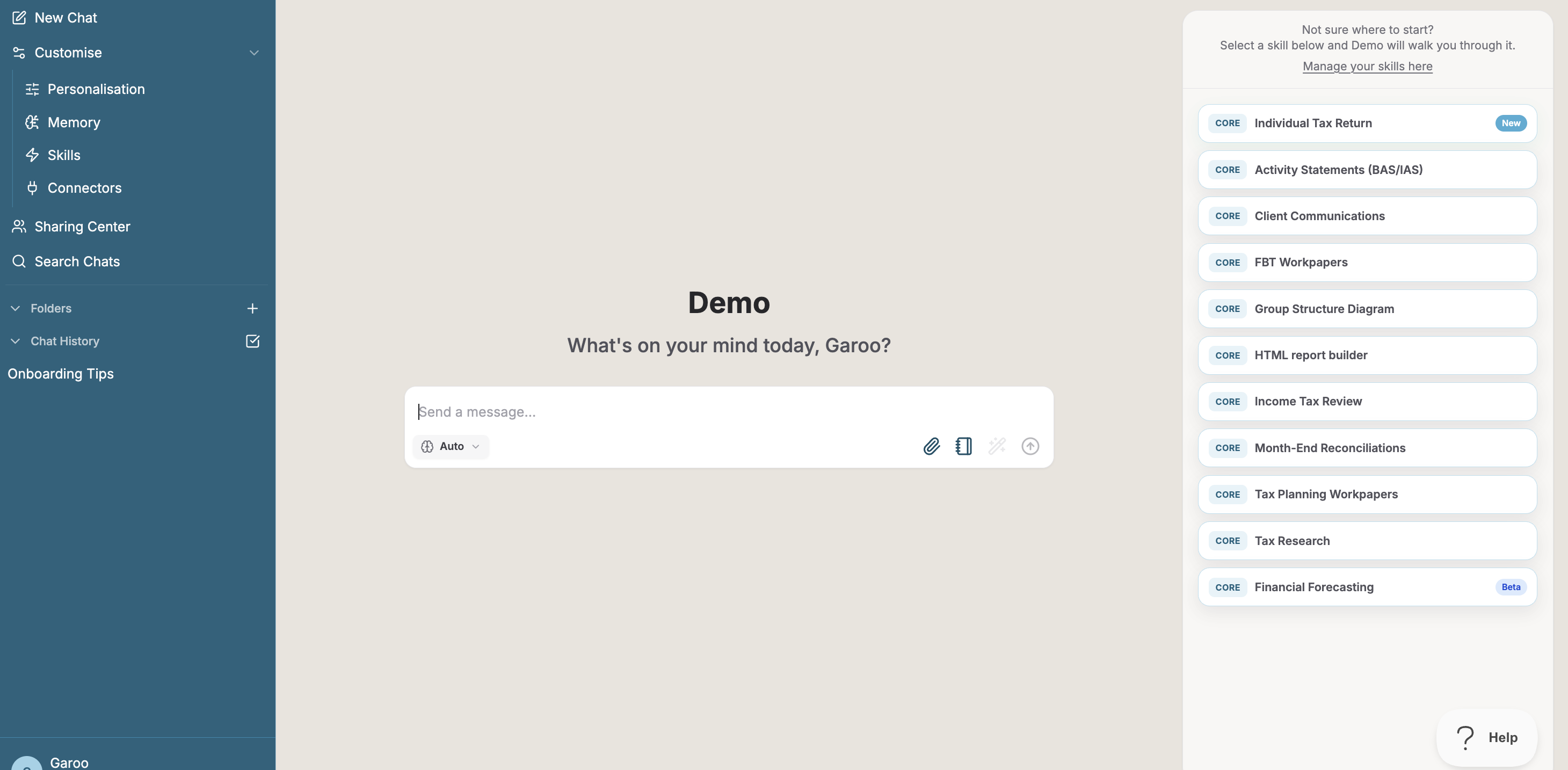
Figure 1: Home Page
- Chat pages – dedicated pages for each conversation. Within a chat, a user can select an underlying AI model (e.g., an OpenAI or Anthropic model, or leave it on an automatic default) and invoke Skills — discrete capabilities that extend what the platform can do, from built-in skills (e.g., referencing published ATO guidance) to skills that call a connected third-party data source, such as Xero, for organisations that enable it. Skills may be provided by AI Dojo or authored by an organisation or user for their own use, and are gated by subscription tier and, where relevant, by whether the required connection is active.
2. System Architecture
2.1 Architecture Overview
The AI Dojo Platform is a cloud-native, multi-tenant SaaS solution hosted in AI Dojo’s Microsoft Azure environment. It provides specialised AI assistants tailored primarily for accounting and related professional services, accessible through a web-based interface. Users interact with the platform via a front-end application that communicates with a backend service responsible for assistant orchestration, prompt handling, and integration with external services such as model inference services (for example, the Databricks AI Gateway, Anthropic, Google, and Fireworks AI) and Databricks Lakebase.
The core platform consists of two main services: a front-end service and a backend assistants service, each deployed as Docker containers on shared Azure compute infrastructure. The multi-tenant architecture ensures that while the underlying infrastructure and application stack are shared, data and configuration are logically isolated per customer organisation. The platform primarily operates in a production mode, with separate non-production environments used by AI Dojo for development, testing, and staging. This design allows the platform to scale efficiently and integrate with external services such as model inference services (for example, the Databricks AI Gateway, Anthropic, Google, and Fireworks AI) and Databricks Lakebase.

2.2 Components Description
Users
Users interact with the AI Dojo Platform through a web front-end. Access is typically provided via the customer’s identity provider (e.g. Microsoft Entra ID) and enforced using role-based access controls.
Azure Resource Group
All production and non-production resources for the AI Dojo Platform are deployed into Azure resource groups managed by AI Dojo. These resource groups contain both platform services and the supporting networking, storage, and monitoring components.
Azure Linux Virtual Machines (Prod / Dev)
Azure Linux virtual machines host the platform services as Docker containers in both production and development environments:
- Front-end container
- Provides the web application used by end users.
- Handles authentication, session management, and UI rendering.
- Communicates securely with the backend assistants service via HTTPS.
- The front-end also runs a lightweight background-job worker (outbound email delivery, scheduled notifications) as a separate container process from the same image.
- Assistants (backend) container
- Acts as the core application backend and API surface for the platform.
- Manages organisation configuration, request routing to AI assistants, and integration with external services such as model inference services (the Databricks AI Gateway, Anthropic, Google, Fireworks AI), Databricks Lakebase, Redis, and storage.
- Implements business logic for accounting-focused assistants (e.g. General Ledger Assessment, Financial Statement and Tax Return Review).
- Connector Proxy Container
- A dedicated backend service that mediates all platform access to connected third-party business systems (currently Xero). It runs as its own container, independent of the Front-end and Assistants containers, and holds no application business logic beyond authentication and command execution: it manages OAuth token exchange and refresh, stores connection credentials in an envelope-encrypted form (a per-user data key, itself wrapped by a key held in Azure Key Vault), and executes only the data requests a user has authorised, scoped to that user's connection. Isolating this into its own service means a fault or compromise in third-party connector logic cannot directly reach chat, authentication, or organisation-configuration data. (Not to be confused with the Databricks Access Connectors described below, which are an unrelated Azure/Unity Catalog construct.)
- Redis
- Provides in-memory caching and transient state to improve performance and responsiveness (for example, caching configuration, session-related data, or intermediate AI responses).
Code Execution Sandbox (Prod / Dev)
Certain Skills (for example, generating and running short data-processing scripts) execute inside an isolated sandbox environment on a dedicated worker VM, separate from the VM(s) running the Front-end and Assistants containers. Code executed in the sandbox has no access to platform secrets, the production database, or other organisations' data; only the execution output is returned to the chat that requested it.
Networking Resources (Prod / Dev)
Each environment includes supporting Azure networking components:
- Virtual Networks and Subnets for isolating platform services and controlling traffic flows.
- Network Interfaces and Network Security Groups (NSGs) to control and restrict inbound and outbound traffic at the VM/network level.
- Public IP Addresses used for controlled external access to the platform.
Databricks VNet Peering
The Azure Databricks workspace operates on a dedicated VNet that is peered to both the production and development platform VNets. This peering enables Databricks clusters and jobs to access platform storage accounts and other services over private network paths without traversing the public internet.
Databricks Lakebase (Postgres-compatible database)
The platform's primary relational data store. Lakebase is a serverless, Postgres-compatible database managed within the platform's Azure Databricks workspace. It persists organisation configuration and metadata, chat history and audit-relevant interaction data, connector credentials (in a separate, access-restricted schema — see §4.3), and other platform data structures. Multi-organisational data remains logically isolated by organisation identifiers, enforced at the application layer. Lakebase also supports lightweight database branching, which the platform uses to give preview/testing environments their own isolated, disposable copy of the schema without provisioning a separate database server per environment.
Azure Storage Accounts
Azure Storage Accounts are used to store:
- User-uploaded files (e.g. documents analysed by assistants).
- Static content and other persistent application artefacts as required.
- Unity Catalog external location data for Azure Databricks.
All data is encrypted at rest using Azure-managed keys, with access controlled via identity and network rules. Databricks Access Connectors authenticate to storage accounts using managed identities with least-privilege role assignments.
Azure Databricks
A VNet-injected Azure Databricks workspace is deployed on a dedicated Virtual Network. The Databricks VNet is peered to both the production and development platform VNets, enabling secure connectivity to platform storage accounts and other services without traversing the public internet. Unity Catalog is configured as the centralised data governance layer. The workspace also runs the platform’s scheduled data pipelines (for example, the memory-consolidation job described in §4.3) and hosts the Databricks AI Gateway described below.
Databricks AI Gateway (Model Inference)
Most model inference is routed through the Databricks AI Gateway (Unity Gateway) in the platform’s Azure Databricks workspace. The gateway fronts models that Databricks hosts and provides as ADI Services — currently OpenAI GPT, Google Gemini, Zhipu AI GLM, Moonshot AI Kimi, DeepSeek and Thinking Machines Lab Inkling models — together with the Qwen3-Embedding model used for memory retrieval. The platform authenticates to the gateway with a Databricks service principal (OAuth machine-to-machine, short-lived access tokens that are refreshed automatically), and gateway requests are tagged so that usage and cost can be attributed by environment and workload. Anthropic Claude models, certain Google Gemini models, and open-weight models that Databricks does not yet host (served by Fireworks AI) are called directly through the relevant provider’s API. Section 4.3 sets out, provider by provider, how customer content is handled.
Azure Container Registry
An Azure Container Registry is used to store built container images
for the front-end and assistants (backend) services.
Azure Front Door and CDN Profiles
Azure Front Door and associated CDN profiles are used to efficiently deliver organisation-specific branding assets to end users:
- Serve organisation-level branding artefacts (such as hero images, favicons, and other static assets) that are stored in Azure Storage Accounts.
- Optimise performance and latency for these assets via caching and global content distribution.
- Provide a secure, scalable entry point and routing layer in front of the platform for static branding resources exposed to the front-end UI.
Monitoring and Alerts
- Metrics and Alerts (e.g. high CPU, low memory usage on VMs or containers) to detect resource constraints and performance issues.
Environments (Prod and Dev)
The diagram distinguishes:
- Prod Platform and Prod Related Resources – the primary, customer-facing multi-organisation environment.
- Dev Platform and Dev Related Resources – used internally by AI Dojo for development, testing, and staging of changes before promotion to production.
2.3 Interactions and Data Flow
- User interacts with the front-end (authenticated via Microsoft Entra ID).
- Request is handled by the Assistants backend (validation, organisation context, model and skill resolution).
- Before any model is called, the Assistants backend detects and masks Australian Tax File Numbers (TFNs) in the user’s message and in the conversation context (§4.3). AI processing then occurs via the selected model’s inference route — the Databricks AI Gateway for Databricks-hosted models, or the Anthropic, Google or Fireworks AI API directly (§4.3); the response is streamed back through Redis (§2.2).
- Where a Skill is invoked, the platform may draw on additional context or capabilities scoped to the current user/organisation: retrieving the user's stored Memory, executing a read-only request against a connected third-party system via the Connector Proxy (e.g., Xero), or running generated code in the isolated sandbox.
- Database access (Lakebase) for organisation data, chat history, and (where applicable) connector credentials.
- File storage in Azure Storage Accounts.
- Response delivered to the user.
- Application logging and auditing persisted to the database. Where a memory-eligible interaction occurred, an asynchronous process (a scheduled job in the Azure Databricks workspace that calls a Databricks-hosted model through the Databricks AI Gateway) later extracts and stores durable memory items for that user (step 4 of a subsequent conversation).
2.4 Infrastructure Technology Stack
The following table summarises the core Microsoft Azure services and infrastructure components used to host and operate the AI Dojo Platform.
| Technology | Description |
|---|---|
| Azure Linux Virtual Machines | Host the front-end and assistants (backend) services, each running as Docker containers in both production and development environments. |
| Docker Containers (Front-end and Assistants) | The front-end container provides the web UI and communicates with the backend over HTTPS. The assistants container implements core platform logic, organisation handling, and integrations with model providers, Lakebase, Redis, and storage. |
| Databricks Lakebase | Primary relational data store (Postgres-compatible, serverless); persists organisation config, chat history, connector credentials, audit logs; supports lightweight branching for preview environments |
| Redis | Chat-response streaming transport; also in-memory cache for transient/session data and the email background-job queue |
| Azure Storage Accounts | Store user-uploaded and assistant-generated files, organisation-specific branding artefacts, and Unity Catalog external location data. |
| Azure Front Door and CDN Profiles | Deliver organisation-specific branding assets from Azure Storage to end users, providing secure, low-latency access and caching for static content. |
| Microsoft Entra ID / Google Workspace | Secure access to the platform through single sign-on. Microsoft Entra ID sign-ins must assert multi-factor authentication; Google sign-ins must assert it or complete an authenticator-app verification. Role-based access control is enforced in the application. |
| Azure Key Vault | Centrally stores secrets and environment variables for platform containers. Secrets are retrieved at runtime via an automated script, stored in ephemeral VM storage, and injected into containers at startup. |
| Azure Databricks | VNet-injected workspace on a dedicated VNet peered to production and development platform VNets. Provides Unity Catalog for centralised data governance, with per-environment catalogs backed by external locations on platform ADLS Gen2 storage accounts. |
| Databricks Access Connectors | Per-environment managed identity connectors providing least-privilege access to platform storage accounts |
| Databricks AI Gateway (ADI Services) | Governed gateway through which Databricks-hosted OpenAI, Google Gemini and open-weight models, and the memory embedding model, are called; access is controlled by Unity Catalog permissions, and requests are tagged for usage and cost attribution. |
| Azure Container Registry | Stores built images for the frontend and assistants (backend) services. |
| Connector Proxy Service | Dedicated backend service mediating access to connected third-party systems (Xero); handles OAuth token lifecycle and envelope-encrypted credential storage |
| Code Execution Sandbox | Isolated dedicated-VM environment for executing Assistant-generated code, separate from application containers |
2.5 Application and External Services Stack
The following diagram provides a high-level view of the AI Dojo Platform application stack (front-end and backend technologies) and the key external services integrated with the platform. This diagram is intended to complement the infrastructure-focused architecture described in Sections 2.1–2.4.

3. Deployment Model

3.1 Deployment Topology
The AI Dojo Platform is deployed and operated by AI Dojo within AI Dojo–managed Azure subscriptions. All deployments are automated using Infrastructure as Code and Azure DevOps pipelines.
Azure DevOps (AI Dojo)
- AI Dojo uses GitHub for source control and CI/CD pipelines (via GitHub Actions), with Jira used for project and work item tracking. The platform source code is maintained in separate development and production branches within the same repository. CI/CD pipelines build container images, run automated tests, and publish images to the AI Dojo container registry.
Infrastructure as Code and App Registrations
- Terraform (and related Infrastructure as Code tooling) is used to provision and update Azure resources, including virtual machines, networking, storage, databases, monitoring, and required app registrations (for example, Microsoft Entra ID applications).
Container Registry (AI Dojo)
- Built images for the front-end and assistants (backend) services are pushed to an AI Dojo–managed container registry. Versioning and promotion between development and production are controlled via GitHub pipelines and release processes.
Platform Virtual Machines
- Azure Linux VMs run the platform's containers using a blue-green deployment model: two identical sets of containers ("colours") run side by side, with an nginx reverse proxy directing live traffic to the active colour. A deployment pulls the new image, starts it on the currently-inactive colour, verifies it passes its health check, then switches traffic to it — so a release does not require taking the service offline. Each container also runs a Docker health check on an ongoing basis; if a running container becomes unhealthy, nginx automatically fails traffic over to the other colour within seconds, and an automatic-restart sidecar recovers the unhealthy container. A maintenance-mode holding page can also be enabled deliberately (for example, during a planned database maintenance window) without affecting the health-check path used by monitoring.
Branding Storage Container (AI Dojo)
- Organisation-specific branding assets (for example, hero images, favicons, and other static files) are stored in an AI Dojo–managed storage container. The front-end retrieves these assets via Azure Front Door/CDN, allowing AI Dojo to apply or update customer branding without redeploying application code.
3.2 Environment Configuration
-
Production Environment
The production environment is the primary, customer-facing multi-organisation deployment of the AI Dojo Platform. It runs production branches of the front-end and backend containers, connected to production-grade Lakebase, Redis, storage, and networking resources. Changes are promoted into production only after passing through AI Dojo’s release and validation processes.
-
Development / Non-Production Environments
AI Dojo maintains separate non-production environments for building, testing, and validating changes prior to release. These environments mirror the production architecture as closely as practical but may use scaled-down resources. Non-production environments are not exposed to end users and are used solely by AI Dojo’s internal teams.
3.3 High Availability and Scalability
High Availability
- Blue-green container deployment with automatic nginx failover between colours, per-container Docker health checks, and an automatic-restart sidecar for containers that are running but unhealthy (see §3.1).
- Databricks Lakebase provides managed availability and point-in-time restore for the primary data store (see §6.3).
- The current production topology runs on a single application VM per environment. A multi-node, load-balanced architecture — removing the application VM as a single point of failure and adding a highly-available Redis configuration — is designed and scoped, and will be introduced as customer scale requires it.
Scalability
- Increase VM compute resources.
- Scale Lakebase compute and Redis capacity independently of the application tier.
- Optimise caching and data access patterns.
4. Security
4.1 Security Requirements
The AI Dojo Platform is designed and operated as a multi-organisation SaaS service hosted within AI Dojo’s Microsoft Azure environment. The platform adheres to the following security requirements:
- Data Protection: Customer data (including prompts, chat history, uploaded files, and configuration) must be protected in transit and at rest using industry-standard encryption and secure key management practices.
- Organisation Isolation: Customer organisations must be logically isolated to prevent unauthorised access or data leakage between organisations. Organisational context must be enforced consistently across application logic, storage access, and database operations.
- Authentication and Authorisation: Access to the platform must be restricted to authorised users and systems using secure authentication (for example, Microsoft Entra ID) and role-based access controls to enforce least privilege.
- Secure Operations and Change Control: Platform infrastructure and application changes must be deployed through controlled, auditable processes (for example, CI/CD with approvals) with repeatable configuration management and segregation between production and non-production environments.
- Infrastructure and Application Hardening: Underlying compute, networking, and application components must be hardened in accordance with Azure and industry best practices, with regular patching and vulnerability management to minimise exposure.
- Network Security: All external and internal communications must use secure protocols (for example, HTTPS/TLS). Network controls must restrict inbound and outbound traffic to required paths only, and prevent unauthorised access to administrative interfaces and data services.
- Monitoring, Logging, and Auditability: Security-relevant events and application logs must be captured to support operational monitoring, incident investigation, and compliance reporting. Application-level logs and audit records are persisted in dedicated Lakebase tables with access controls and retention policies appropriate to the service.
- Availability and Resilience: The platform must be designed to maintain availability and recoverability appropriate for a production SaaS offering, including backups for persistent data stores and defined recovery procedures.
4.2 Identity and Access Management
Authentication
The AI Dojo Platform uses enterprise single sign-on (SSO) for user authentication. Users sign in with a work or school Microsoft Entra ID account or a Google Workspace account; personal Microsoft and Gmail accounts are rejected at sign-in, and the platform does not maintain local usernames or passwords. The platform is registered as a multi-tenant Microsoft Entra ID application, allowing customer organisations to authorise access from their own Entra tenant via standard consent and enterprise application controls. Sessions expire after 24 hours.
Multi-Factor Authentication (MFA)
- Microsoft Entra ID: The platform requests the authentication-methods (
amr) claim in the Entra ID token and rejects any sign-in that does not assert multi-factor authentication, including a sign-in that carries no authentication-method information. A user who has not completed MFA is returned to the sign-in page with a message to enable MFA with their organisation. The second factor itself is performed by the customer’s own Entra ID tenant (for example, through Conditional Access or Security Defaults), so customers retain control of which factors they permit. - Google Workspace: Google sign-ins are limited to organisational Google Workspace accounts. The platform requests the authentication-methods (
amr) claim from Google. Where Google asserts that the user completed multi-factor authentication, the user proceeds. Otherwise — including where Google does not return authentication-method information — the sign-in is held as a provisional session that can reach only the verification screen until the user completes an authenticator-app (TOTP) verification, enrolling an authenticator app on first use if they have not already done so. Customers can also require 2-Step Verification in their own Google Workspace. - Authenticator-app (TOTP) verification: Codes are standard 6-digit, 30-second time-based one-time passwords, compatible with common authenticator apps such as Google Authenticator and Microsoft Authenticator. Secrets are encrypted at rest (AES-256-GCM) using a key held outside the database; a code that has already been accepted cannot be reused; and five failed attempts lock verification for that user for 15 minutes. A successful verification is remembered for 24 hours. If a user loses their device, AI Dojo staff can reset the factor: a reason must be recorded, the reset is written to the audit log, and all of that user’s sessions are revoked.
- AI Dojo staff: AI Dojo staff accounts are subject to the same sign-in controls, and AI Dojo’s own Microsoft Entra ID tenant enforces MFA for its users through Entra Security Defaults.
Terminology note: The term Entra tenant refers to a customer’s Microsoft Entra ID directory. The term organisation refers to a tenant entity within the AI Dojo Platform. Users authenticate via Entra ID (or Google Workspace) and are then authorised within one or more organisations in the platform. By default, organisations are mapped to an email domain (and therefore commonly align to a single Entra tenant), however the platform supports a user belonging to multiple organisations where configured.
Platform Roles and Authorisation (RBAC)
Role-based access control is enforced within the application to ensure least-privilege access:
- AI Dojo Super Admins: Restricted to authorised AI Dojo employees (accounts on the AI Dojo domain) for platform operations, support, and administration across organisations. See Privileged Access below.
- Organisation Admins: Customer-designated administrators within a specific organisation (tenant) who can access the platform’s admin portal to manage users and organisation-level configuration within their own organisation.
- Organisation Users: Standard end users restricted to permitted assistants and organisation-scoped data.
Authorisation decisions are made using authenticated identity claims (including organisation context) and platform role assignments.
Privileged Access (AI Dojo Super Admins)
- What the role is for: Super Admin capabilities are provided through the platform’s staff portal and are limited to platform administration: managing organisations and their configuration (including subscription tier, consumption limits and status), managing users’ roles and organisation administrators, managing the skills and models catalogues, and managing feature flags.
- What the role cannot do in the application: The platform has no feature that lets a Super Admin read customers’ chat content, uploaded documents, stored memory, or data retrieved from connected systems such as Xero. Chats and files are accessible only to the user who owns them (or to users with whom the chat has been shared) within that user’s organisation, and the platform has no impersonation or “view as user” capability.
- Logging: The following privileged actions are written to audit tables with the acting user, the time and the before-and-after values: changes to user roles and organisation administrators; creation and modification of organisations (including consumption limits); and creation, modification and deletion of skill configurations. Successful sign-ins and sign-in errors are also recorded. Audit tables are append-only in normal operation, are retained, and can be queried by AI Dojo’s security team to support investigations and customer requests.
- Customer-visible records: Organisation administrators can view the activity log for Xero connections in their organisation. Other audit records are not shown in the admin portal and are provided to customers on request.
Organisation (Tenant) Isolation and Context Enforcement
All requests are associated with an organisation identifier derived from the authenticated session and platform configuration. Organisation isolation is enforced in the application layer of a shared platform; there is no separate database or storage account per organisation. On each request the platform verifies that the user holds an active membership of the organisation, applies role checks (user, analyst, admin, staff), and applies per-resource ownership and sharing checks before returning chats, files or configuration. Uploaded files are stored under organisation- and user-scoped paths, and the backend validates the requested path against the caller’s organisation and user before serving a file. Memory retrieval is filtered by user and organisation.
Isolation Testing
Automated tests run in the platform’s CI pipelines covering membership and role enforcement (including denial of access to non-members and deactivated members), access to chats owned by or shared with other users, organisation-, user- and chat-scoped file paths, sandbox volume scoping, and memory-retrieval scoping. AI Dojo has not yet commissioned an independent penetration test of the platform, including organisation isolation.
Customer Identity Controls (Entra ID and Google Workspace)
Customer organisations can apply additional identity governance controls within their own Entra ID tenant or Google Workspace (for example, Conditional Access policies and 2-Step Verification). Customers may also restrict which users can sign in by controlling access to the enterprise application, however day-to-day user access management is primarily performed through the AI Dojo Platform’s organisation admin portal.
Administrative Access to Underlying Infrastructure
Access to AI Dojo’s Azure infrastructure resources (such as virtual machines, storage accounts, Lakebase, Redis, and networking) is restricted to AI Dojo’s authorised operational personnel. Customers do not receive direct access to underlying infrastructure resources as part of the SaaS offering. Infrastructure-level access is separate from the application role model described above and is not exposed through the staff portal; because data is stored in the platform’s database and storage, personnel with infrastructure credentials can technically reach it, and use of that access is restricted to operating, supporting and securing the service.
Databricks Access and Governance
Access to Azure Databricks and Unity Catalog resources is governed through a combination of Databricks Access Connectors (managed identity-based) and Unity Catalog grants:
- Databricks Access Connectors (connector-prod, connector-test) authenticate to platform storage accounts using managed identities, with least-privilege Azure RBAC role assignments
- Unity Catalog grants control access to catalog objects (schemas, tables, external locations) on a per-environment basis. Access is granted as appropriate to each environment.
Future Identity Provider Support
Microsoft Entra ID and Google Workspace are the supported identity providers for the current release; the platform roadmap includes support for additional identity providers and federation methods as required by customers.
4.3 Data Security
Encryption
- Data in Transit: All data exchanged between users, the AI Dojo Platform, and supporting services is encrypted using TLS 1.2 or higher.
- Data at Rest: Data stored by the platform (including uploaded files in Azure Storage and relational data in Databricks Lakebase) is encrypted at rest using Azure-managed encryption mechanisms (AES-256).
Network-Level Protection (Firewall / IP Whitelisting)
- Azure Storage Accounts are protected using firewall rules and IP allowlists to restrict access to approved platform infrastructure only (for example, the production and development platform virtual machines).
Data Storage and Segregation
- Lakebase (Postgres-compatible): Organisation data is logically segregated by identifiers, with access enforced by application-layer controls. Connector credentials (e.g., Xero OAuth tokens) are stored in a separate database schema from application data, encrypted with per-user keys (detailed below), and are not reachable through the application's normal data-access paths.
- Azure Storage Accounts: Store user-uploaded files and organisation-specific branding assets. Access is restricted to platform services and controlled through identity and network policies.
- ADLS Gen2 and Unity Catalog Storage: The platform storage accounts have been migrated to ADLS Gen2 to support Azure Databricks Unity Catalog external locations. Dedicated containers store catalog-managed data. Access to these containers is mediated by Databricks Access Connectors using managed identities, and Unity Catalog grants enforce object-level access control within each environment's catalog.
Sensitive Data Detection and Masking (Tax File Numbers)
The platform detects and masks Australian Tax File Numbers (TFNs) on the server before customer content is sent to any model provider. The control is part of the Assistants backend, is always on for every organisation, and cannot be switched off by users or organisation administrators.
- Detection: candidate nine-digit numbers (a single run of digits, or grouped 3-3-3 with a single space or hyphen) are validated against the standard TFN check-digit algorithm, and only numbers that pass are treated as TFNs. This keeps false positives low: ABNs, phone numbers and identifiers are not masked.
- Masking: a detected TFN is replaced with a placeholder that keeps only the last three digits (for example,
[REDACTED TFN *782]). Masking is one-way: the original value is not stored in a lookup table and is not restored in responses. - Where it occurs: (1) when a user message reaches the Assistants backend, before it is logged, stored, or used for model routing or memory retrieval; (2) immediately before every model call, across the whole conversation — system instructions, user and assistant messages, tool-call arguments and tool outputs, including text the model has read from uploaded documents in the sandbox — so earlier content is re-checked on every turn; and (3) on tool outputs before they are stored or streamed.
- Limits of the control: TFN masking applies to text. Images (including scanned pages saved as images) are passed to vision-capable models as images and are not subject to text masking, and TFNs written in formats other than those above are not detected. Uploaded files are stored unmodified in Azure Storage. The control masks TFNs only: other personal or financial information in a conversation (for example names, addresses, ABNs and bank details) is not masked and is sent to the selected model provider as part of the prompt. Organisations remain responsible for deciding what client information they upload.
Third-Party Processing (Model Inference)
When generating assistant responses, the AI Dojo Platform transmits customer content — after TFN masking — such as prompts, conversation history, extracts of uploaded documents that the model reads during a conversation, and model outputs, to the inference service for the model the user has selected. The route used for each model is platform configuration managed by AI Dojo and changes as models are added, moved or retired. At the date of this document:
| Route | Processor | Models |
|---|---|---|
| Databricks AI Gateway (ADI Services) | Databricks | OpenAI GPT-6 models; Google Gemini 3.8 Flash; Moonshot AI Kimi K3; Thinking Machines Lab Inkling; Zhipu AI GLM 5.3 and GLM 5.3 Flash; DeepSeek V4.1 Flash. The Qwen3-Embedding model used for memory retrieval is also served here. |
| Anthropic API | Anthropic | Anthropic Claude models |
| Google Gemini API | Selected Google Gemini models (currently Gemini 3.1 Pro and Gemini 3.5 Flash Lite) | |
| Fireworks AI API | Fireworks AI | Open-weight models not yet available through Databricks (currently Qwen, MiniMax and NVIDIA Nemotron models) |
| OpenAI API | OpenAI | Supporting functions that call OpenAI directly (for example, prompt enhancement) |
Databricks (ADI Services)
Models provided through ADI Services are hosted by Databricks and called through the Databricks AI Gateway in AI Dojo’s Azure Databricks workspace. Databricks acts as a data processor for AI Dojo under an executed Data Processing Addendum. Databricks states that, for paid accounts, Model Serving does not use customer inputs or outputs to train any models or improve any Databricks services, and that for Foundation Model APIs it may temporarily process and store inputs and outputs solely to prevent, detect and mitigate abuse — isolated from other customers, stored in the same region as the workspace, and retained for up to 30 days. Foundation Model APIs are a Databricks Designated Service: customer content is processed in the workspace’s Azure geography where the model is available there; where a model is not natively available in the Australia geography, Databricks may process requests in another geography under its cross-geography processing arrangements, and customer content is not stored outside the workspace’s geography. Partner model providers whose models are offered through ADI Services may apply retention for safety purposes under the terms for the relevant model. Requests use short-lived OAuth tokens and are encrypted in transit (TLS 1.2+).
OpenAI (API inference)
OpenAI’s GPT models are served to users through Databricks (above). The platform also calls the OpenAI API directly for a small number of supporting functions (for example, prompt enhancement). AI Dojo configures OpenAI API usage such that customer content is not shared for OpenAI model training or improvement (i.e. opted out of data sharing for training/improvement where available in OpenAI settings). The platform also disables response storage for relevant requests (for example, store=false ).
Anthropic (API inference)
By default, Anthropic states it will not use inputs or outputs from its commercial products (including the Anthropic API) to train its models.
Anthropic states that for Anthropic API users, it automatically deletes inputs and outputs on its backend within 30 days of receipt or generation, except in specific cases (e.g. where longer retention is under customer control, by agreement, for usage policy enforcement, or legal compliance).
Google AI Studio (API inference)
AI Dojo uses Google's Gemini API directly for selected Gemini models, and exclusively under its paid/commercial terms. Google's Gemini API Additional Terms of Service state that for Paid Services, "Google doesn't use your prompts... or responses to improve our products" — governed by a Data Processing Addendum under which Google acts as a data processor. (This is distinct from Google's unpaid/consumer tier, which does use content for product improvement by default — not the tier AI Dojo uses.) Google's Gemini/Vertex AI services hold SOC 1/2/3 and ISO 27001/27017/27018/27701/42001 certifications. Other Gemini models are accessed through Databricks (above).
Fireworks AI (API Inference)
AI Dojo uses Fireworks AI only for open-weight models that are not yet available through Databricks. Fireworks AI applies a zero-data-retention policy by default: prompt and generation data exist only in volatile memory for the duration of a request and are not logged, stored, or used to train or improve models, unless AI Dojo explicitly opts in to a logging feature. Fireworks AI holds SOC 2 Type II and ISO 27001/27701/42001 certifications, and encrypts data in transit (TLS 1.2+) and at rest (AES-256).
Xero (Accounting Data):
Where an organisation enables the Xero connector, AI Dojo requests only narrowly-scoped, read-only access to the connected Xero organisation's data (contacts, invoices, bank transactions, standard reports, and similar) — no write or lodgement scopes are requested. OAuth credentials are never stored in plaintext: each user's tokens are encrypted with a per-user data key, which is itself wrapped by a key held in Azure Key Vault, before being written to the database. Tokens are decrypted only transiently, in-process, at the moment a request is executed on the user's behalf. Command arguments are redacted before being written to the audit log — free-text fields are one-way hashed for correlation rather than stored in the clear. A user can disconnect a Xero organisation at any time, which revokes the token with Xero and permanently deletes the stored credential.
Access Control
Access to sensitive data is restricted using the platform’s RBAC model (AI Dojo super admins, organisation admins, and organisation users) and least-privilege access for services. Data access is always evaluated in the context of the authenticated user and organisation (tenant).
Secrets and Credentials
Service credentials and secrets are stored in Azure Key Vault. At container startup, an automated script retrieves secrets and stores them in ephemeral storage on the VM before attaching them to the Docker runtime. This ensures secrets are not persisted to disk and are scoped to the container lifecycle. Access to Key Vault is restricted to authorised services and AI Dojo operational personnel, and managed identities are used where supported to reduce reliance on long-lived credentials.
Logging and Auditability
Application logs and audit-relevant events are written to dedicated tables within Lakebase. Log access is restricted to authorised roles and used to support troubleshooting, security monitoring, and incident investigation.
Data Retention and Deletion
The platform does not currently apply automatic expiry to customer content. Retention by type of data is as follows:
| Data | Retention |
|---|---|
| Uploaded documents | Held in Azure Storage until removed by AI Dojo; no automatic expiry. Deleting a chat does not currently delete files uploaded to it. |
| Chat history | Retained while the organisation is active. When a user deletes a chat it is hidden from the user and excluded from memory processing (a soft delete); there is no automatic purge. |
| Audit logs | Retained indefinitely. Audit tables are append-only in normal operation and are replicated as an append-only history into Unity Catalog (§6.2). |
| Usage and operational telemetry | Usage and application telemetry is stored in Unity Catalog tables with no automatic expiry. Infrastructure logs in Azure Monitor are retained for 30 days. |
| Memory data | Retained until the user suppresses an item; suppressed items are excluded from use but retained in the database. |
| Code-execution sandbox | Sandbox workspaces are removed after about one hour of inactivity. A snapshot of each chat’s workspace is saved to Azure Storage so work can be resumed; snapshots have no automatic expiry. |
| Response streaming (Redis) | Streaming data expires after about six minutes. |
| Backups and recovery | Lakebase point-in-time restore window of 7 days (§6.3). Files deleted from Azure Storage remain recoverable for 7 days (blob soft delete). |
On termination of an organisation’s subscription, AI Dojo deletes the organisation’s data on request — including user accounts, chats and messages, and uploaded documents and files — and can provide a deletion summary report. Deletion and de-identification after termination is governed by the Data Processing Addendum.
User Memory
To personalise future responses, the platform builds a memory for each user from that user’s own chat history. A scheduled job in the platform’s Azure Databricks workspace periodically reads the user’s stored chat history (which has already passed through TFN masking), uses a Databricks-hosted model to extract durable, user-specific context (facts, preferences, and working patterns referenced across conversations), and stores the resulting memory items in Lakebase together with vector embeddings generated by a Databricks-hosted embedding model. Stored memory is scoped to the individual user, is never shown to or shared with other users in the organisation, and a user can view, correct, or suppress any stored memory item from within the platform at any time. A user can turn memory off for their own account, which stops the platform retrieving or updating that user’s memory in conversations; background memory consolidation for the account is not currently suspended by that setting. There is currently no organisation-level setting to disable memory; organisations that would like one can raise it as a feature request, which AI Dojo will evaluate.
Code Execution Isolation
Skills that execute generated code do so inside an isolated sandbox environment on infrastructure separate from the Front-end and Assistants containers, with no access to platform secrets, the production database, or other organisations' data. Sandbox network access is enabled by default (for example, to install packages and retrieve web content) and is not currently restricted on a per-organisation basis.
Azure Security Features Utilised
The following table summarises the Microsoft Azure security features utilised by the AI Dojo Platform to protect customer data and maintain secure operations.
| Azure Security Feature | How AI Dojo Uses It |
|---|---|
| Azure-managed encryption (AES-256) | All data at rest (Lakebase, Storage Accounts, VM disks) is encrypted using Azure-managed keys. |
| TLS 1.2+ enforcement | All external and internal communications (user to platform, platform to Azure services, platform to model providers) use TLS 1.2 or higher. |
| Network Security Groups (NSGs) | Restrict inbound and outbound traffic to platform VMs; only required ports and paths are exposed. |
| Azure Firewall / IP allowlisting | Azure Storage Accounts are restricted to platform infrastructure IP addresses only. |
| Azure Key Vault | Centrally stores secrets and credentials; accessed via managed identities where supported to minimise long-lived credentials. |
| Azure Update Manager | Automated security patching for Ubuntu VMs with a weekly maintenance window (Sunday early morning AEST). |
| Azure Monitor / Metrics and Alerts | Infrastructure health monitoring with alerts for resource thresholds (for example, high CPU, low memory). |
| Lakebase encryption at rest | Primary database encryption (Postgres-compatible, Databricks-managed) |
| Azure Key Vault–wrapped connector credentials | Envelope-encrypted third-party OAuth tokens (per-user data key wrapped by a Key Vault–held key) |
| Lakebase point-in-time restore | Configurable restore window (2–30 days; AI Dojo runs the default 7-day window); a restore creates a new branch, leaving the live database untouched and operational throughout |
| Microsoft Entra ID (multi-tenant application) | Enterprise single sign-on (SSO) with support for customer-enforced MFA and Conditional Access policies; the platform rejects Entra ID sign-ins that do not assert MFA and requires Google sign-ins to assert MFA or complete an authenticator-app verification. |
| Azure Front Door / CDN | Secure, low-latency delivery of organisation-specific branding assets with caching and global distribution. |
By leveraging these Azure-native security features, AI Dojo ensures that foundational infrastructure security is managed by Microsoft's certified and audited platform, while AI Dojo maintains responsibility for application-layer controls and operational security.
4.4 Compliance and Regulatory Considerations
The Platform is designed to support Australian regulatory and customer governance requirements:
- Australian Privacy Principles (APPs): The platform is designed to support compliance with the Australian Privacy Act 1988 and the Australian Privacy Principles through appropriate controls for data handling, access restriction, and auditability.
- Data Residency (AI Dojo Platform Data Stores): The AI Dojo Platform and all AI Dojo–managed data stores are deployed in Microsoft Azure Australia East, ensuring data residency within Australia. This includes:
- Databricks Lakebase (organisation configuration, chat history, audit logs)
- Azure Storage Accounts (user-uploaded files, branding assets)
- Redis (transient cache)
- Azure Linux Virtual Machines (application containers)
- Azure Key Vault (secrets and credentials)
- Azure Databricks workspace and Unity Catalog
- Azure Container Registry
- Microsoft Azure provides data residency commitments for these services within the Australia East region. For further detail, refer to Microsoft Azure data residency documentation.
- Customer Governance Alignment: Customers can apply additional controls through their own Microsoft Entra ID tenant (for example, MFA and Conditional Access policies) and through platform role assignments (organisation admins and users) to align platform use with internal security and compliance requirements.
- Model Inference Data Handling (Databricks, OpenAI, Anthropic, Google, Fireworks AI): The platform uses third-party model inference services. When generating AI assistant responses, the AI Dojo Platform transmits customer content (such as prompts and document extracts, after TFN masking) to the selected provider, which may process data outside Australia. Where Databricks-hosted models are used, a model that is not natively available in the Australia geography may be processed in another geography; customer content is not stored outside the workspace’s geography.
- As documented by Databricks, Model Serving does not use customer inputs or outputs from paid accounts to train models or improve Databricks services; for Foundation Model APIs, inputs and outputs may be temporarily stored in the workspace’s region, isolated per customer, for up to 30 days solely for abuse detection and response. Databricks acts as a data processor under a Data Processing Addendum.
- As documented by Anthropic for commercial offerings (including the Anthropic API), inputs/outputs are not used for model training by default, and Anthropic API inputs/outputs are deleted within 30 days except in defined circumstances (for example, usage policy enforcement or legal requirements).
- As documented by Google, under its Paid Services terms (the tier AI Dojo uses), Google does not use prompts or responses submitted via the Gemini API to improve its products, governed by a Data Processing Addendum under which Google acts as a data processor. Limited logging occurs only for abuse/policy-violation detection and legal compliance.
- As documented by Fireworks AI, prompt and generation data exist only in volatile memory for the duration of a request and are not logged, stored, or used to train or improve models, unless AI Dojo explicitly opts in to a logging feature (it has not). This zero-data-retention default applies to the open-weight models AI Dojo uses via Fireworks.
- As documented by OpenAI, data sent to the OpenAI API (used directly for a small number of supporting functions) is not used to train or improve OpenAI models unless explicitly opted in. AI Dojo has configured OpenAI usage to opt out of data sharing for training/improvement and to disable response persistence (for example,
store=false). OpenAI may retain API content in abuse monitoring logs for up to 30 days by default (unless legally required to retain longer). - Customers with strict Australian data residency requirements should consider these third-party processing flows when assessing the platform's suitability for their use case. AI Dojo can discuss alternative configurations or model provider options where required.
- Configurable Compliance: Where required, the platform can be configured to support additional customer compliance requirements, subject to feasibility and agreed implementation scope.
Inherited Azure Compliance Certifications
The AI Dojo Platform is hosted on Microsoft Azure Australia East, which holds a comprehensive set of compliance certifications relevant to Australian enterprises and professional services firms. By hosting on Azure, AI Dojo inherits the foundational infrastructure-level controls validated by these certifications.
Key Azure certifications inherited by the AI Dojo Platform include:
| Certification / Framework | Relevance |
|---|---|
| ISO/IEC 27001 | International standard for information security management systems (ISMS). |
| ISO/IEC 27017 | Cloud-specific security controls guidance. |
| ISO/IEC 27018 | Protection of personal data in public cloud environments. |
| SOC 1, SOC 2, SOC 3 | Independent assurance over security, availability, processing integrity, confidentiality, and privacy controls. |
| IRAP (PROTECTED) | Australian Government Information Security Registered Assessors Program — assessed to PROTECTED level. |
| PCI DSS | Payment Card Industry Data Security Standard (applicable where payment data is processed). |
| Australian Privacy Principles (APPs) | Azure's alignment with the Privacy Act 1988 and APPs for Australian customers. |
For the full list of Azure compliance offerings, refer to the Microsoft Azure Compliance Offerings documentation.
How AI Dojo extends these controls:
AI Dojo leverages Azure's certified infrastructure for foundational controls including physical security, host and network infrastructure, platform-level encryption (AES-256 at rest, TLS 1.2+ in transit), and managed service availability. AI Dojo's own security programme extends these controls to the application layer, including:
- Multi-organisation (tenant) isolation and RBAC enforcement
- Application-level logging and audit trails
- Secrets management and credential handling
- Secure SDLC, change control, and patch management
- Incident response and disaster recovery procedures
AI Dojo has completed a self-assessment of the AI Dojo Platform and its supporting corporate IT against ISO/IEC 27002:2022 and is remediating the gaps it identified. AI Dojo is pursuing SOC 2 Type II and ISO/IEC 27001 certification for the AI Dojo Platform to provide independent assurance over these application-layer controls.
4.5 Threat Model and Mitigation
| Potential Threat | Corresponding Mitigation Strategy |
|---|---|
| Unauthorised Access: Risk of unauthorised users gaining access to the platform or elevated privileges within an organisation (tenant) or across tenants. | Strong Authentication and Identity Controls: Use Microsoft Entra ID and Google Workspace for SSO, with the platform requiring MFA at sign-in and customers able to enforce MFA and Conditional Access. Apply least privilege via platform RBAC, including strict separation of AI Dojo super admin capabilities and organisation admin/user roles. |
| Organisation Isolation Failure: Risk of misconfiguration or application defects leading to cross-organisation data exposure. | Organisation Context Enforcement: Enforce organisation (tenant) scoping throughout application logic and data access. Validate organisation context on every request and for every database/storage operation to prevent cross-organisation access. |
| Data Breach / Data Exfiltration: Exposure of customer data due to weak access controls, credential compromise, or misconfigured storage/database/network rules. | Network Controls and Firewalls: Restrict access to Lakebase and Storage Accounts using firewall rules and IP allowlists limited to the platform infrastructure. Limit VM inbound traffic to required ports and paths using NSGs and controlled entry points. |
| Credential and Secret Compromise: Exposure of sensitive credentials (for example, Model Provider API keys, database credentials, signing secrets) through insecure storage, logging, or operational access. | Secure Secrets Management: Secrets are stored in Azure Key Vault and retrieved at runtime via an automated script, then held in ephemeral VM storage and injected into containers at startup. This avoids persisting secrets on disk. Access to Key Vault is restricted, credentials are rotated where appropriate, and secrets are prevented from being written to logs. |
| Application Vulnerabilities: Exploitation of vulnerabilities in the web application, backend APIs, container images, or underlying VM OS. | Secure SDLC and Change Control: Use CI/CD pipelines with reviews and approvals, automated testing, and controlled promotion from non-production to production. Maintain auditable Infrastructure as Code for repeatable, consistent deployments. |
| Supply Chain Risk: Malicious or vulnerable third-party dependencies or container base images impacting platform integrity. | Hardening and Patch Management: Regularly patch VM operating systems and container base images. Apply vulnerability management processes for application dependencies and container images. |
| Denial of Service (DoS): Attacks that disrupt availability through request flooding, resource exhaustion, or abuse of AI endpoints. | Rate Limiting and Abuse Controls: Implement request throttling, resource limits, and guardrails to reduce the impact of DoS and excessive usage. Use caching (Redis) and capacity controls to protect shared resources. |
| Data Loss / Corruption (Accidental or Malicious): Risk of customer or platform data being deleted, corrupted, or rendered unrecoverable due to human error, software defects, malicious activity, or underlying infrastructure failure. | Backups and Recovery: Use managed database backup capabilities and Infrastructure as Code to support restoration and recovery following incidents or failures. |
| Prompt Injection / Data Leakage via AI: Attempts to manipulate assistant behaviour to disclose sensitive information, bypass controls, or retrieve data outside the user’s organisation context. | AI Safety and Data Leakage Controls: Apply defensive prompting and tool restrictions, limit assistant capabilities to intended actions, and prevent assistants from accessing data outside the authenticated organisation context. |
| Third-Party Service Risk (Model Inference: Databricks, OpenAI, Anthropic, Google, Fireworks AI): Data handling, availability, or policy constraints of the model inference service impacting confidentiality, integrity, or availability. |
Third-Party Controls (Databricks, OpenAI, Anthropic, Google, Fireworks AI):
|
| Arbitrary code execution (via AI-generated scripts, invoked as a Skill) | Execution isolated to a dedicated sandbox environment with no access to secrets, the production database, or other organisations' data |
| Third-party financial/accounting data exposure (Xero) | Read-only, narrowly-scoped OAuth permissions; per-user envelope-encrypted credential storage; redacted audit logging; user-initiated disconnect immediately revokes and deletes the credential |
Potential Threats
- Unauthorised Access: Risk of unauthorised users gaining access to the platform or elevated privileges within an organisation (tenant) or across tenants.
- Organisation Isolation Failure: Risk of misconfiguration or application defects leading to cross-organisation data exposure.
- Data Breach / Data Exfiltration: Exposure of customer data due to weak access controls, credential compromise, or misconfigured storage/database/network rules.
- Credential and Secret Compromise: Exposure of sensitive credentials (for example, Model Provider API keys, database credentials, signing secrets) through insecure storage, logging, or operational access.
- Application Vulnerabilities: Exploitation of vulnerabilities in the web application, backend APIs, container images, or underlying VM OS.
- Supply Chain Risk: Malicious or vulnerable third-party dependencies or container base images impacting platform integrity.
- Denial of Service (DoS): Attacks that disrupt availability through request flooding, resource exhaustion, or abuse of AI endpoints.
- Prompt Injection / Data Leakage via AI: Attempts to manipulate assistant behaviour to disclose sensitive information, bypass controls, or retrieve data outside the user’s organisation context.
- Third-Party Service Risk (Model Inference Providers): Data handling, availability, or policy constraints of the model inference service impacting confidentiality, integrity, or availability.
- Data Loss / Corruption (Accidental or Malicious): Risk of customer or platform data being deleted, corrupted, or rendered unrecoverable due to human error, software defects, malicious activity, or underlying infrastructure failure.
Mitigation Strategies
- Strong Authentication and Identity Controls: Use Microsoft Entra ID and Google Workspace for SSO, with the platform requiring MFA at sign-in and customers able to enforce MFA and Conditional Access. Apply least privilege via platform RBAC, including strict separation of AI Dojo super admin capabilities and organisation admin/user roles.
- Organisation Context Enforcement: Enforce organisation (tenant) scoping throughout application logic and data access. Validate organisation context on every request and for every database/storage operation to prevent cross-organisation access.
- Network Controls and Firewalls: Restrict access to Lakebase and Storage Accounts using firewall rules and IP allowlists limited to the platform infrastructure. Limit VM inbound traffic to required ports and paths using NSGs and controlled entry points.
- Encryption: Enforce TLS 1.2+ for all communications and encryption at rest (AES-256) for data stored in Lakebase and Storage Accounts.
- Secure Secrets Management: Store and access secrets using approved secure mechanisms, restrict operational access, rotate credentials where appropriate, and prevent secrets from being written to logs.
- Secure SDLC and Change Control: Use CI/CD pipelines with reviews and approvals, automated testing, and controlled promotion from non-production to production. Maintain auditable Infrastructure as Code for repeatable, consistent deployments.
- Hardening and Patch Management: Regularly patch VM operating systems and container base images. Apply vulnerability management processes for application dependencies and container images.
- Rate Limiting and Abuse Controls: Implement request throttling, resource limits, and guardrails to reduce the impact of DoS and excessive usage. Use caching (Redis) and capacity controls to protect shared resources.
- AI Safety and Data Leakage Controls: Apply defensive prompting and tool restrictions, limit assistant capabilities to intended actions, and prevent assistants from accessing data outside the authenticated organisation context.
- Third-Party Controls (Databricks, OpenAI, Anthropic, Google, Fireworks AI): Mask Tax File Numbers on the server before any model call, and call Databricks-hosted models through the Databricks AI Gateway under a Data Processing Addendum with short-lived credentials. Configure OpenAI usage with data sharing for training/improvement disabled and response storage disabled (for example,
store=false). Acknowledge that OpenAI may retain API content in abuse monitoring logs for up to 30 days by default, and monitor vendor policy changes as part of operational governance. Anthropic states that by default it does not use Anthropic API inputs/outputs to train models, and that Anthropic API inputs/outputs are deleted within 30 days subject to defined exceptions. - Backups and Recovery: Use managed database backup capabilities and Infrastructure as Code to support restoration and recovery following incidents or failures.
Monitoring, Detection, and Response
- Access Logging and Audit Trails: Record key application events and audit-relevant activity into dedicated Lakebase tables to support investigation and compliance needs.
- Operational Alerts: Implement alerts for resource saturation (for example, high CPU / low memory) and error rate anomalies to detect availability and performance issues early.
- Incident Response: AI Dojo maintains documented incident management processes covering triage, containment, eradication, recovery, and post-incident review, including customer communications where required.
4.6 Shared Responsibility Model
The AI Dojo Platform operates under a shared responsibility model, where security and compliance obligations are distributed between Microsoft Azure (as the cloud infrastructure provider), AI Dojo (as the SaaS platform operator), and the customer organisation.
| Responsibility Area | Microsoft Azure | AI Dojo | Customer |
|---|---|---|---|
| Physical data centre security | ✓ |
|
|
| Host infrastructure, hypervisor, and network fabric | ✓ |
|
|
| Azure platform service availability and resilience | ✓ |
|
|
| Platform-level encryption (at rest and in transit) | ✓ |
|
|
| Virtual machine and container patching |
|
✓ |
|
| Application-layer security and hardening |
|
✓ |
|
| Organisation (tenant) isolation and RBAC enforcement |
|
✓ |
|
| Secrets and credential management (Key Vault) |
|
✓ |
|
| Application logging, monitoring, and incident response |
|
✓ |
|
| Disaster recovery procedures and backup validation |
|
✓ |
|
| Verification that MFA was completed at sign-in (Microsoft Entra ID and Google Workspace sign-ins) |
|
✓ |
|
| Identity provider governance (MFA, Conditional Access) |
|
|
✓ |
| User provisioning and access reviews |
|
|
✓ |
| Acceptable use and internal security policies |
|
|
✓ |
This model ensures that AI Dojo builds upon Microsoft Azure's certified and audited infrastructure controls, while maintaining responsibility for application-level security, multi-organisation isolation, and operational processes. Customers retain responsibility for identity governance within their own Microsoft Entra ID tenant and for ensuring appropriate use of the platform within their organisation.
5. Integration and Interoperability
5.1 Integration Points
The AI Dojo Platform integrates with a limited set of third-party services to provide AI inference, web-enabled assistants, transactional communications, billing, and customer support. These integrations are implemented server-side and are governed by least-privilege access controls and organisational context enforcement within the platform.
- Microsoft Entra ID and Google Workspace (SSO): Used for user authentication via a multi-tenant Entra ID application registration and Google sign-in for Google Workspace organisations. Customers can apply additional governance controls (for example, Conditional Access, MFA and 2-Step Verification) in their own tenant, while day-to-day user access is primarily managed within the platform by organisation admins.
- Model Providers (AI Inference): Databricks (ADI Services), OpenAI, Anthropic, Google, and Fireworks AI: Used to generate assistant responses and perform AI-powered processing. The platform sends user prompts and required context to the selected model provider for inference. Provider API keys are managed as secrets and are not exposed client-side.
- Databricks (ADI Services) hosts the OpenAI, Google Gemini and open-weight models called through the Databricks AI Gateway; Databricks acts as a data processor under a Data Processing Addendum and states that customer inputs and outputs are not used to train models for paid accounts.
- AI Dojo has opted out of sharing data for OpenAI model training or improvement, and response persistence is disabled for relevant endpoints (for example,
store=false). OpenAI may retain customer content in abuse monitoring logs for up to 30 days by default (unless legally required to retain longer). OpenAI API keys are managed as secrets and are not exposed client-side. - Anthropic states that by default it does not use Anthropic API inputs/outputs to train models, and that Anthropic API inputs/outputs are deleted within 30 days subject to defined exceptions.
- Google states that on its paid API tier it does not use prompts or responses to improve its products, governed by a Data Processing Addendum.
- Fireworks AI applies a zero-data-retention policy by default for the open-weight models used here.
- Firecrawl (Web Search and Scraping): Used by web-capable assistants to perform searching and scraping of external websites. The platform sends search queries and/or URLs to retrieve, and Firecrawl returns retrieved web content. Firecrawl is accessed server-side only, and the scope of web access (broad web versus targeted domains) depends on the assistant configuration. Web search and scraping are provided through the Firecrawl foundation skill, which is available to all users; it cannot currently be disabled for an individual organisation from the admin portal. Organisations that would like this control can raise it as a feature request, which AI Dojo will evaluate.
- Resend (Outbound Transactional Email): Used to send invitations, onboarding communications, and product tips. The platform sends recipient email addresses, template content, and delivery metadata required to deliver messages. The platform does not ingest inbound email.
- Stripe (Subscriptions and Billing): Used to manage subscription billing (plan and team-size based; no usage metering). The platform exchanges customer and subscription lifecycle data required for billing operations (for example, customer identifiers, plan selection, and billing status) using server-side integration patterns.
- Help Scout (Support and Help Documentation): Used to provide help documentation access and customer support workflows (including in-app support experiences and ticketing/escalation processes where enabled). Support requests and related metadata are processed within Help Scout according to configured support processes.
- Xero (Accounting Data): For organisations that enable it, the platform integrates with Xero so that, within a chat, a Skill can reference a connected organisation's accounting data (e.g., invoices, contacts, bank transactions, and standard reports) when responding to a user request. Access is established through a per-user OAuth connection with narrowly-scoped, read-only permissions; only the specific data needed to answer a given request is retrieved, and nothing is written back to Xero. Users can view connection status and disconnect at any time from the platform's Connections settings.
AI Dojo aims to minimise data shared with third-party services to what is required for functionality, and enforces organisation (tenant) context throughout the platform to reduce the risk of cross-organisation data exposure.
5.2 API and SDK
The AI Dojo Platform does not currently provide a public API or SDK for customer integration. All user interactions are performed through the web application. Any programmatic integration requirements are handled on a case-by-case basis and may be considered for future releases subject to product roadmap and security review.
5.3 Interoperability Standards
The AI Dojo Platform is designed to interoperate with customer environments using widely adopted web and identity standards:
- Web Standards: The platform is delivered as a browser-based application over HTTPS, using REST-style APIs between the front-end and backend services where applicable.
- Identity Standards: Authentication and single sign-on are implemented using Microsoft Entra ID and Google Workspace via standard OAuth 2.0 and OpenID Connect (OIDC) flows, supporting enterprise identity governance controls such as MFA and Conditional Access.
- Data Formats: Platform communications and integrations use standard, structured formats (for example, JSON) to support consistent handling of requests, responses, and operational data.
6. Support and Maintenance
6.1 Support Plan & SLAs
The Support Plan for the AI Dojo Platform and associated Service Level Agreements (SLAs) are maintained in AI Dojo’s Help Scout documentation. Customers should refer to the Help Scout support documentation for the current support model, coverage, and SLA commitments.
6.2 Monitoring and Logging
Monitoring Mechanisms
-
Infrastructure Health Monitoring
Azure-native monitoring for compute and networking (VM availability, resource utilisation), with alerts for high CPU and low memory.
-
Container and Service Health Monitoring
Each application container exposes a health-check endpoint (an
/api/healthzfamily for the front-end;/healthzfor the Assistants backend), polled continuously by Docker's built-in health checker. An automatic-restart sidecar recovers containers that are running but unhealthy; nginx automatically redirects traffic away from an unhealthy deployment colour to the other one (see §3.1). A layered set of endpoints (covering the database, backend, authentication, and a shallow send-message probe) allows finer-grained checks of individual dependencies, each protected by an internal API key except the top-level check, and rate-limited to prevent misuse. -
Service Availability Monitoring
Basic external checks for outages or degraded access, triggering operational investigation. Extending this to structured, synthetic/browser-based monitoring of key user journeys (login, chat, file upload) from multiple regions is planned but not yet implemented.
Logging Mechanisms
-
Usage Analytics and Telemetry (Databricks Unity Catalog)
Platform usage analytics and telemetry data — including usage logs, assistant interaction metrics, and organisation-level analytics are stored in per-environment Unity Catalog tables within Azure Databricks. Access to telemetry data is controlled via Unity Catalog grants. This approach provides environment-level isolation of telemetry data, managed identity-based access control, and a scalable analytics layer backed by ADLS Gen2 storage.
-
Audit Logging
Audit tables in Lakebase record role and organisation-administrator changes, organisation configuration changes, skill-configuration changes, Xero connection activity and sign-in events (see §4.2) to support investigation, governance, and compliance reporting. These tables are also replicated as an append-only change history into Unity Catalog tables in the Azure Databricks workspace, so edits or deletions made to the live audit tables remain visible.
Key Practices
- Centralised Log Storage: Application and audit logs are centrally stored in Lakebase to support querying, analysis, and operational investigation.
- Access Controls: Access to logs is restricted to authorised roles under least-privilege controls.
- Retention Policies: Retention periods for each type of data are set out in §4.3 (Data Retention and Deletion).
- Alerting and Response: Infrastructure alerts (such as CPU/memory thresholds) are configured to notify AI Dojo operations for timely triage and remediation.
6.3 Disaster Recovery Plan
Objective
The objective of this Disaster Recovery (DR) Plan is to ensure the AI Dojo Platform can recover from service disruptions while minimising downtime and data loss, and restoring secure service operation as quickly as practical.
Scope
This plan covers the AI Dojo Platform production environment hosted in Microsoft Azure Australia East, including application services (front-end and assistants containers), platform data stores (Lakebase, Azure Storage Accounts, Redis), and supporting infrastructure (networking and compute). It also considers dependencies on third-party services used by the platform (for example, Databricks, OpenAI, Anthropic, Google, Fireworks AI, Firecrawl, Stripe, Resend, and Help Scout).
Recovery Objectives
- Recovery Time Objective (RTO): Target ≤ 4 hours during business hours (Melbourne time: AEST/AEDT), depending on failure scope, complexity, and third-party dependencies. This is a target: end-to-end application recovery has not been exercised in a full drill. This target will be reviewed as the platform scales.
- Recovery Point Objective (RPO): ≤ 5 minutes (maximum acceptable data loss window, supported by Lakebase point-in-time restore capability). Point-in-time restore was validated against production data on 2nd October 2026: a restore to a point 3 minutes prior completed in seconds, with row-level agreement. Restores can reach back at most the 7-day retention window.
Backup and Restore Strategy (Current)
- Lakebase (primary database): point-in-time restore within a configurable window (2–30 days; AI Dojo runs the default 7-day window). A restore creates a new branch containing the data as of the selected moment, leaving the live database untouched and operational throughout the restore — reducing the risk associated with the restore step itself, compared with a traditional in-place restore. Lakebase also supports on-demand snapshots and standard
pg_dump/pg_restorefor portable exports. - Azure Storage Accounts: Uploaded files and branding assets are stored in Azure Storage and are protected via Azure storage redundancy (Locally-redundant storage - LRS) and encryption at rest (AES‑256).
- Configuration and Compute: Platform infrastructure and configuration are reproducible via Infrastructure as Code and container image redeployment.
High-Level Recovery Procedure
- Incident triage and containment: Assess impact, isolate the fault domain (application, database, storage, VM, or third-party dependency), and enact immediate containment steps.
- Service restoration:
- Redeploy platform containers from the approved images if the issue is application/compute related.
- Restore Databricks Lakebase using point-in-time restore to a new branch if required.
- Validate service health and data integrity post-restore (smoke tests, authentication checks, key user journeys).
- Operational verification: Confirm platform stability, monitor for recurrence, and validate key integrations.
- Communications: Provide customer updates through established support channels (Help Scout, Platform, Email), including status and expected timelines where appropriate.
- Post-incident review: Document root cause, corrective actions, and preventive measures.
Third-Party Dependency Considerations
Where third-party services are unavailable (for example, a Databricks AI Gateway, model provider or Firecrawl outage), the platform retries and, where a model provider remains unavailable, can fall back to a model served by a different provider. It may also operate in a degraded mode (for example, disabling web-capable assistants) or temporarily restrict functionality while maintaining core authentication and platform availability where possible.
Recovery Testing Status
Beyond the point-in-time restore validation described under the RPO above, the platform’s restore primitives are exercised routinely: every preview environment and every pre-production migration rehearsal is created as a branch of a Lakebase database, and a full-size copy of production data was restored into a Lakebase branch and verified against row counts during the July 2026 migration to Lakebase. A full end-to-end disaster recovery exercise, including recovery of the application tier, has not yet been performed (see the RTO above), and a scheduled restore test cadence is on the roadmap below.
Testing and Continuous Improvement (Roadmap / To Do)
AI Dojo maintains a DR improvement roadmap, including:
- Define and publish production RTO and RPO targets by customer tier.
- Establish a scheduled restore test cadence (for example, quarterly) and record outcomes.
- Formalise runbooks and escalation paths for common failure modes (database restore, VM rebuild, third-party outage).
- Evaluate additional resilience options (for example, multi-VM or zone-redundant architectures) as usage grows.
6.4 Software Updates and Patch Management
AI Dojo manages software updates and patching for the AI Dojo Platform as part of operating the SaaS service:
- Application Releases: Application changes are deployed via controlled CI/CD pipelines. Production releases are typically batched and aligned to sprint delivery, with a scheduled weekly release window (Monday mornings, Melbourne time — AEST/AEDT) to minimise disruption while the platform operates on a single-VM deployment. Where possible, releases are designed to incur minimal downtime (generally a brief service interruption while containers restart). As the platform evolves to support distributed deployments and rolling updates, AI Dojo may increase release cadence (including multiple releases per day) while maintaining change control and reliability.
- Infrastructure Updates: Infrastructure changes are managed via Infrastructure as Code and applied in a controlled manner to minimise disruption to customers. Where possible, changes are performed outside of business hours and validated through pre- and post-change checks.
- Security Patching:
- Virtual Machines: Platform Linux virtual machines run Ubuntu 22.04 LTS and are configured with Azure Update Manager for automatic security patching. Patch orchestration and assessment are set to
AutomaticByPlatform, enabling Azure-orchestrated scanning and patch installation. Critical and security patches are applied automatically within a defined weekly maintenance window (Sunday early morning AEST), with automatic reboot only when required (for example, kernel updates). Maintenance schedules are staggered across environments (dev before prod) to allow validation before production patching. This approach provides centralised visibility via the Azure portal and reduces operational overhead compared to manual patching. - Containers and Dependencies: Container base images and third-party dependencies are updated as part of the regular release cycle and accelerated when critical security issues are identified.
- Security Testing and Vulnerability Management: Container images for the front-end, assistants and connector-proxy services are scanned for known vulnerabilities (Trivy) as part of each build; repositories are scanned for committed secrets (Gitleaks); dependency vulnerability alerts and security updates are enabled across repositories (GitHub Dependabot); Terraform modules are scanned for misconfiguration (tfsec and Checkov); and Microsoft Defender for Cloud assesses the Azure subscription and GitHub organisation for posture weaknesses. Customer-uploaded documents are scanned for malware on upload (Microsoft Defender for Storage). These scans report findings for triage and currently do not block a release. Production changes require pull-request review and passing required checks. No independent penetration test of the platform has yet been performed.
- Virtual Machines: Platform Linux virtual machines run Ubuntu 22.04 LTS and are configured with Azure Update Manager for automatic security patching. Patch orchestration and assessment are set to
- Change Control and Rollback: Production changes follow internal review, testing, and approval practices. Rollback procedures are maintained to restore the prior release if an update causes unexpected impact.
7. Performance and Optimisation
7.1 Performance Requirements
The AI Dojo Platform is designed to provide responsive, reliable assistant interactions for multi-tenant SaaS usage. Key performance requirements include:
- Interactive responsiveness: Typical user interactions should return responses within acceptable timeframes, noting that end-to-end latency depends on external AI inference times and network conditions.
- Availability and reliability: The platform should maintain high service availability and gracefully degrade where external dependencies are unavailable.
- Scalability: The platform should be able to scale to support increasing organisations, users, and concurrent conversations through controlled increases in compute and supporting services.
- Efficiency: Caching and data access patterns should minimise unnecessary load on Lakebase and external services.
- Operational stability: Resource usage (CPU, memory, disk, and network) should remain within safe operating thresholds under expected workloads.
7.2 Load Testing
Formal load testing is planned as part of the platform’s ongoing maturity. AI Dojo will use staged environments to validate performance under representative workloads, focusing on:
- Concurrent user activity and peak usage patterns.
- Assistant response latency distribution, including external model latency.
- Database and cache behaviour under sustained load (reads/writes, connection limits).
- Platform behaviour under failure scenarios (for example, degraded third-party dependencies).
Load testing outcomes and capacity thresholds will be reviewed periodically and used to inform scaling decisions and performance improvements.
7.3 Performance Tuning
AI Dojo applies a continuous performance optimisation approach, including:
- Caching strategy: Use Redis to cache frequently accessed configuration and reduce repeated database reads.
- Database optimisation: Apply indexing, query optimisation, and connection management to ensure stable performance as data volume grows.
- Compute scaling: Scale VM resources (and service allocations) based on observed usage patterns, with controlled changes via Infrastructure as Code.
- External dependency management: Apply sensible timeouts, retries, and backoff for third-party services (for example, OpenAI and Firecrawl) and communicate degraded modes where applicable.
- Payload optimisation: Reduce unnecessary request/response size and avoid redundant upstream calls where possible.
- Release discipline: Validate performance impacts in non-production environments prior to production release, and monitor post-release behaviour to detect regressions.
8. Appendices
8.1 Glossary
| Term/Acronym | Definition |
|---|---|
| ACR | Azure Container Registry — managed Docker container registry service in Microsoft Azure. |
| ADI Services | Services provided by Databricks through which Azure Databricks customers access Databricks-hosted OpenAI, Google Gemini and open-weight models via the Databricks AI Gateway. |
| ADLS Gen2 | Azure Data Lake Storage Gen2 — Azure Blob Storage with Hierarchical Namespace (HNS) enabled, providing file system semantics, directory-level security, and optimised analytics performance. |
| AI | Artificial Intelligence — simulation of human intelligence processes by machines, especially computer systems. |
| AI Gateway (Unity Gateway) | Databricks service that provides governed, authenticated access to model services (including ADI Services models) with usage tracking. |
| API | Application Programming Interface — a set of rules that allows software components to communicate. |
| APM | Application Performance Monitoring — processes and tools used to monitor and manage application performance and availability. |
| Azure | Microsoft Azure — cloud computing platform providing compute, networking, storage, and managed services. |
| CI/CD | Continuous Integration / Continuous Delivery — automated build, test, and deployment processes used to release software changes. |
| Connector Proxy | Internal service mediating platform access to connected third-party systems (e.g., Xero) via per-user OAuth; distinct from a Databricks Access Connector |
| DRP | Disaster Recovery Plan — documented procedures to recover and protect IT services in the event of a disruption. |
| Entra ID | Microsoft Entra ID (formerly Azure Active Directory / Azure AD) — cloud identity and access management service used for authentication and SSO. |
| HA | High Availability — design approach that improves service uptime and resilience. |
| ITSM | IT Service Management — activities and processes for planning, delivering, operating, and controlling IT services. |
| JSON | JavaScript Object Notation — lightweight data interchange format. |
| Lakebase | Databricks' managed, serverless, Postgres-compatible database service; the platform's primary relational data store |
| MFA | Multi-factor authentication — verifying a user’s identity with more than one factor at sign-in. |
| Organisation (Tenant) | A customer entity within the AI Dojo Platform. The platform is multi-organisation and logically isolates data and configuration per organisation. |
| RBAC | Role-Based Access Control — access control model where permissions are granted based on roles. |
| RPO | Recovery Point Objective — maximum tolerable period in which data might be lost due to an incident. |
| RTO | Recovery Time Objective — maximum acceptable time to restore a service after an incident. |
| SaaS | Software as a Service — software delivered and operated by the provider and accessed by customers over the internet. |
| Sandbox (Code Execution) | Isolated runtime environment, on dedicated infrastructure, for executing AI-generated code invoked by a Skill |
| Skill | A discrete capability that extends what the platform's AI can do within a chat (e.g., referencing a specific data source, or invoking a connected third-party system such as Xero). Skills may be provided by AI Dojo or authored by an organisation/user, and are gated by subscription tier and, where relevant, active connections. |
| SLA | Service Level Agreement — formal agreement defining service levels and support commitments. |
| TFN | Tax File Number — a unique identifier issued to Australian taxpayers; masked by the platform before model calls (§4.3). |
| TOTP | Time-based one-time password — a short-lived code generated by an authenticator app and used as a second factor at sign-in. |
| Unity Catalog | A centralised data governance solution for Azure Databricks that provides unified access control, auditing, lineage, and data discovery across workspaces and cloud storage. |
| VM | Virtual Machine — software emulation of a physical computer that runs an operating system and applications. |
| VNet | Virtual Network — logically isolated network within Azure providing connectivity between resources. |
| VPN | Virtual Private Network — extends a private network across a public network. |
| YAML | YAML Ain’t Markup Language — human-readable data serialisation format often used for configuration files. |
8.2 References
- Microsoft. “Azure Architecture Center.” Microsoft Learn. Retrieved from: https://learn.microsoft.com/en-us/azure/architecture/
- Microsoft. “Virtual machines in Azure.” Microsoft Learn. Retrieved from: https://learn.microsoft.com/en-us/azure/virtual-machines/overview
- Microsoft. “What is Azure Virtual Network?” Microsoft Learn. Retrieved from: https://learn.microsoft.com/en-us/azure/virtual-network/virtual-networks-overview
- Microsoft. “What is Azure Front Door?” Microsoft Learn. Retrieved from: https://learn.microsoft.com/en-us/azure/frontdoor/front-door-overview
- Microsoft. “Azure Storage encryption for data at rest.” Microsoft Learn. Retrieved from: https://learn.microsoft.com/en-us/azure/storage/common/storage-service-encryption
- Microsoft. “Microsoft Entra ID documentation.” Microsoft Learn. Retrieved from: https://learn.microsoft.com/en-us/entra/identity/
- OpenAI. “API Reference – Introduction.” OpenAI Platform Docs. Retrieved from: https://platform.openai.com/docs/api-reference/introduction
- OpenAI. “Data controls in the OpenAI platform.” OpenAI Platform Docs. Retrieved from: https://platform.openai.com/docs/guides/your-data
- Microsoft. “Designing for efficiency and scalability on Azure (paired regions / availability guidance).” Microsoft Learn. Retrieved from: https://learn.microsoft.com/en-us/azure/best-practices-availability-paired-regions
- Anthropic. “Is my data used for model training? (Commercial Customers).” Anthropic Privacy Center. https://privacy.claude.com/en/articles/7996868-is-my-data-used-for-model-training
- Anthropic. “How long do you store my organization’s data? (Commercial Customers).” Anthropic Privacy Center. https://privacy.claude.com/en/articles/7996866-how-long-do-you-store-my-organization-s-data
- Microsoft. "Azure Trust Center." Retrieved from: https://azure.microsoft.com/en-au/explore/trusted-cloud/
- Microsoft. "Azure Compliance Offerings." Microsoft Learn. Retrieved from: https://learn.microsoft.com/en-us/azure/compliance/offerings/
- Microsoft. "Microsoft Purview Compliance Manager." Microsoft Learn. Retrieved from: https://learn.microsoft.com/en-us/purview/compliance-manager
- Microsoft. "Shared responsibility in the cloud." Microsoft Learn. Retrieved from: https://learn.microsoft.com/en-us/azure/security/fundamentals/shared-responsibility
- Microsoft. "What is Azure Databricks?" Microsoft Learn. Retrieved from: https://learn.microsoft.com/en-us/azure/databricks/introduction/
- Microsoft. "Unity Catalog overview." Microsoft Learn. Retrieved from: https://learn.microsoft.com/en-us/azure/databricks/data-governance/unity-catalog/
- Microsoft. "Azure Data Lake Storage Gen2 introduction." Microsoft Learn. Retrieved from: https://learn.microsoft.com/en-us/azure/storage/blobs/data-lake-storage-introduction
- Microsoft. "Azure Container Registry documentation." Microsoft Learn. Retrieved from: https://learn.microsoft.com/en-us/azure/container-registry/
- Fireworks AI. "Data Privacy & Security." Fireworks AI Docs. Retrieved from: https://docs.fireworks.ai/guides/security_compliance/data_handling
- Google. "Gemini API Additional Terms of Service." Google AI for Developers. Retrieved from: https://ai.google.dev/gemini-api/terms
- Microsoft. “Databricks Designated Services.” Microsoft Learn. Retrieved from: https://learn.microsoft.com/en-us/azure/databricks/resources/designated-services
- Microsoft. “Deploy models using Model Serving — Data protection in Model Serving.” Microsoft Learn. Retrieved from: https://learn.microsoft.com/en-us/azure/databricks/machine-learning/model-serving/
- Databricks. “ADI Services.” Databricks Documentation. Retrieved from: https://docs.databricks.com/adi
8.3 Contact Information
Solution Architect
Alistair Toms
E: Alistair.Toms@ai-dojo.com.au
M: 0421 190 338
Data Engineer
Yi Xiang Chee
E: Yixiang.Chee@ai-dojo.com.au
M: 0478 913 462
Software Engineer
Vincent Taneli
E: Vincent.Taneli@ai-dojo.com.au
M: 0406 221 916